
VS Code + Codex + Figma MCP 教程
让 Codex 直接读取 Figma Dev Mode 的设计,并生成 UI 代码。
1. 准备工作
- Node.js 已安装,并全局安装/更新 Codex CLI:
npm i -g codex@latest - VS Code + Codex 扩展(已安装并登录)
- Figma 桌面版,打开 Dev Mode
- 已启动 Figma MCP 服务,默认监听
http://127.0.0.1:3845/mcp - 配置文件路径:
C:\Users\<你的用户名>\.codex\config.toml(或~/.codex/config.toml)
2. 安装/启用 Codex
- 在 VS Code 中安装并启用 Codex 扩展,完成登录。
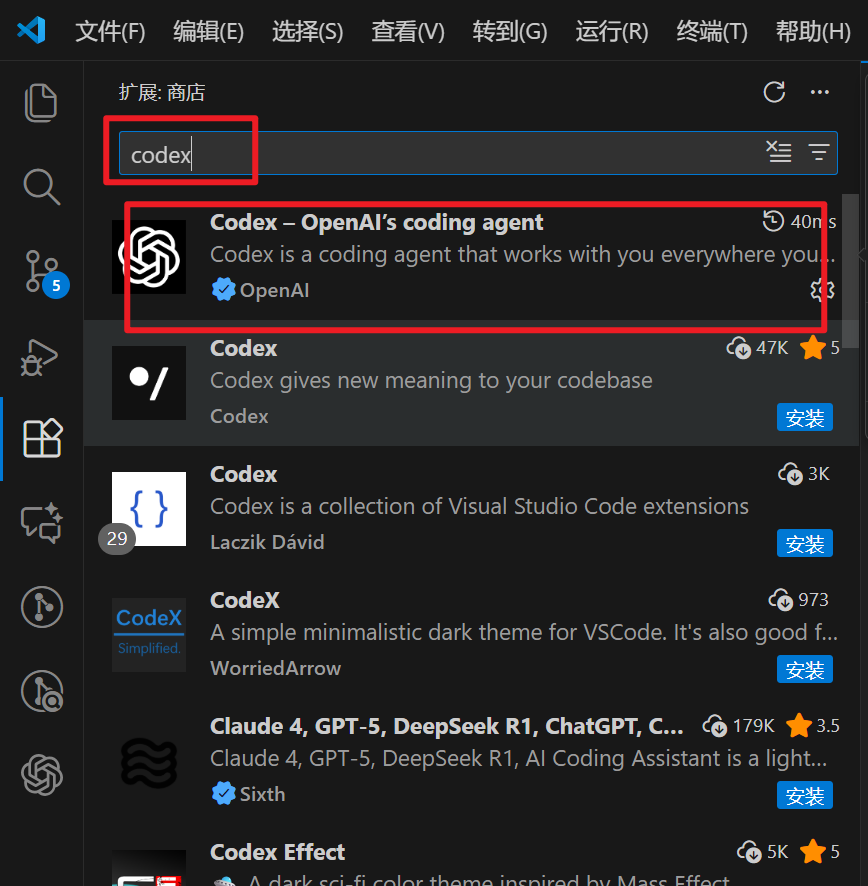
- 在 Codex 设置里选择模型
gpt-5.1-codex-max,推理档位选 High。
3. 在 config.toml 配置 Figma MCP
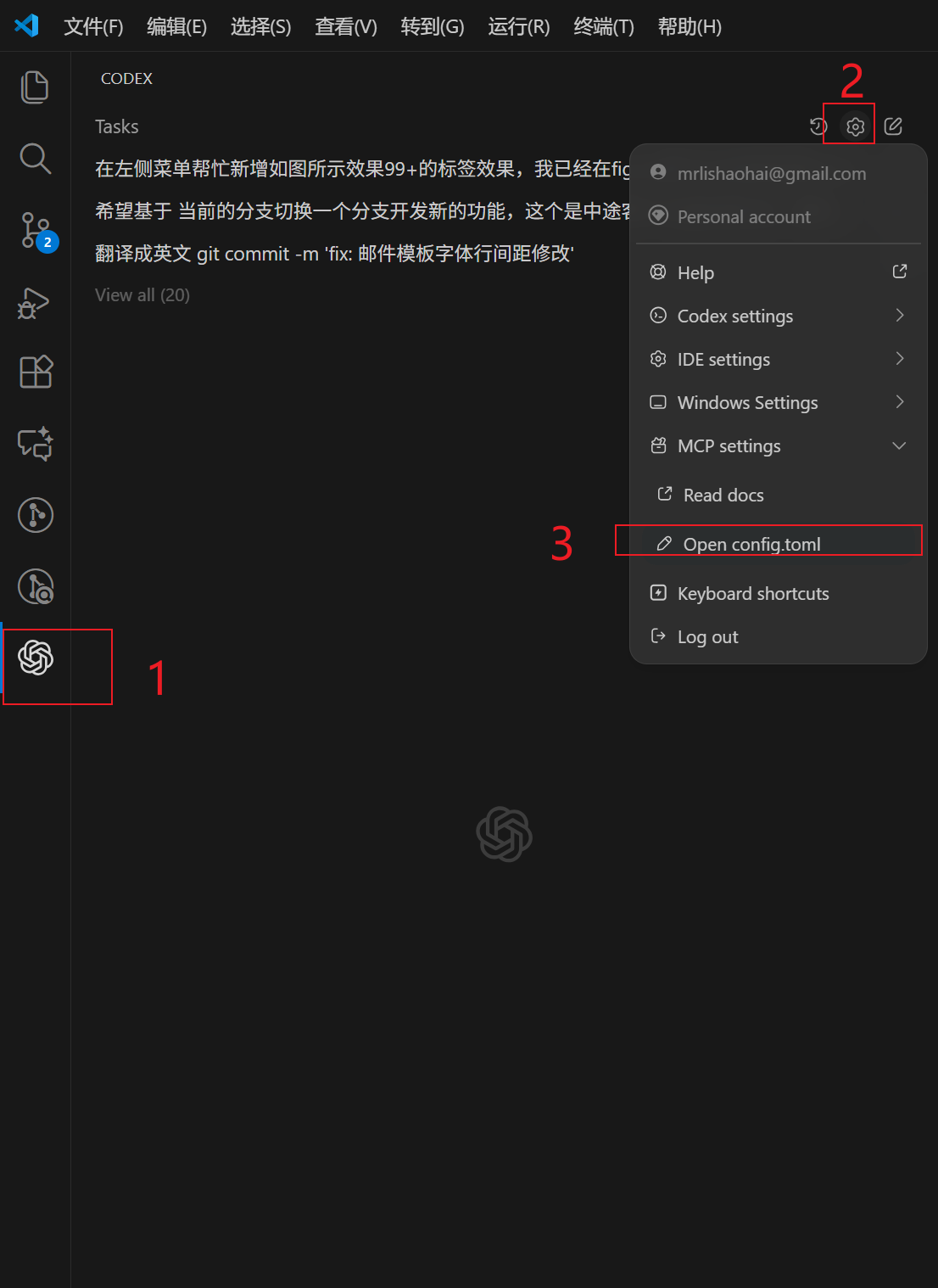
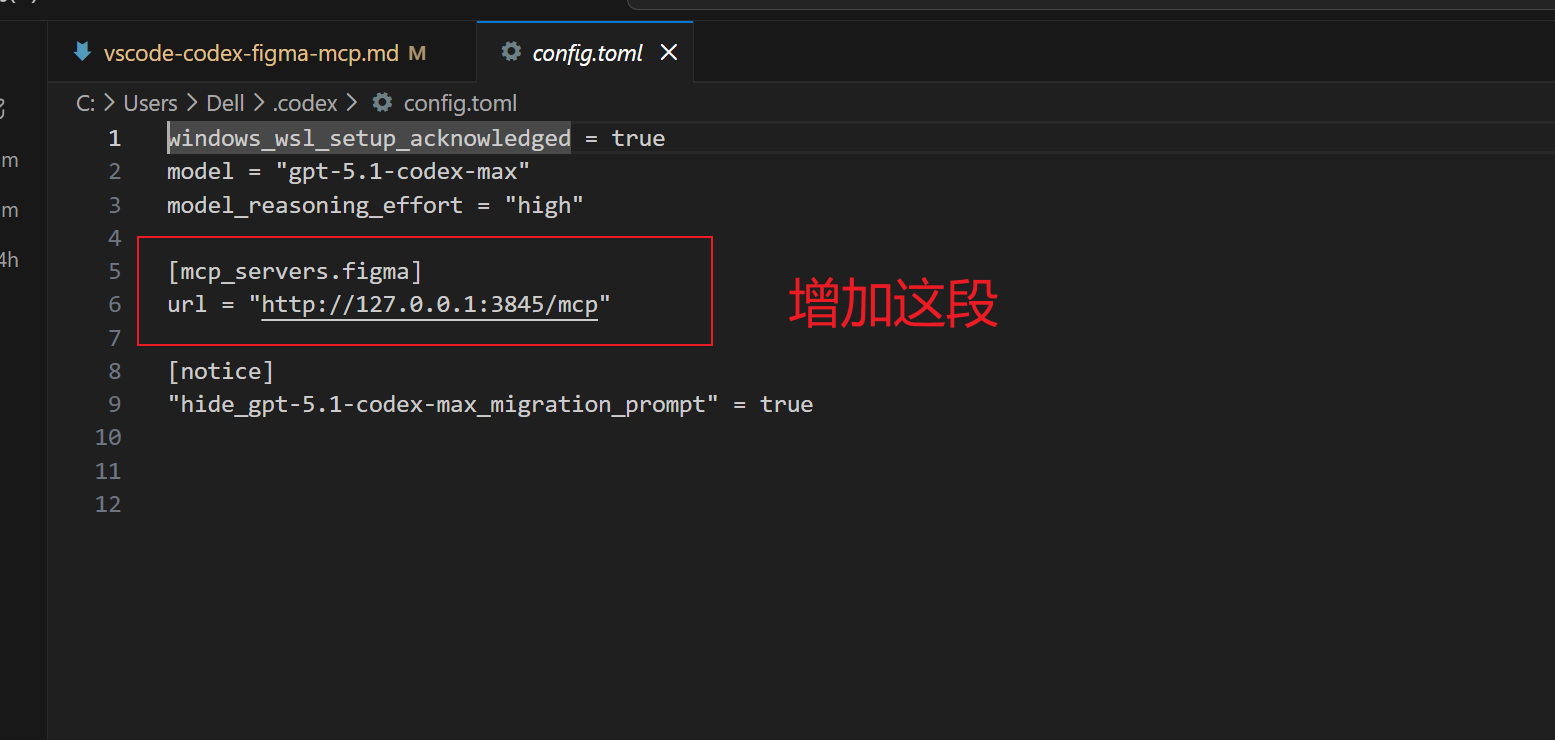
编辑 C:\Users\Dell\.codex\config.toml(用户名按需替换),确认包含以下内容:
toml
windows_wsl_setup_acknowledged = true
model = "gpt-5.1-codex-max"
model_reasoning_effort = "high"

[mcp_servers.figma]
url = "http://127.0.0.1:3845/mcp"

[notice]
"hide_gpt-5.1-codex-max_migration_prompt" = true
DANGER
不要保留占位写法 url = xxx,务必填写实际运行中的 Figma MCP 地址(默认 http://127.0.0.1:3845/mcp)。
修改后重载 VS Code,让 Codex 重新加载配置。
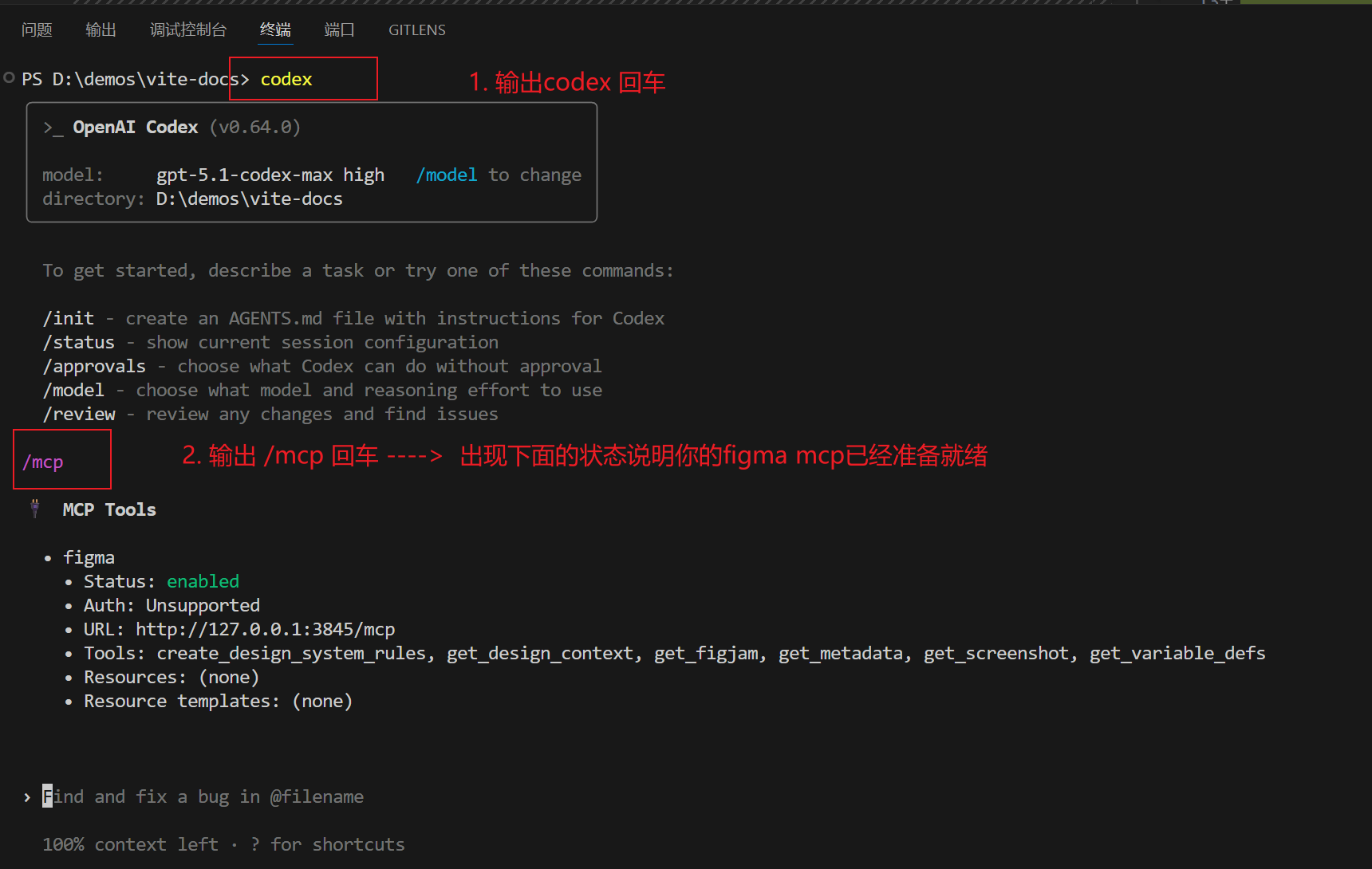
判断 Figma MCP 是否准备就绪:终端输入 codex,再输入 /mcp 查看返回结果。
4. 在 AGENTS.md 补充团队约定
将下面的段落追加到 AGENTS.md,让团队在写 UI 时始终利用 Figma MCP:
markdown
## Figma MCP Usage

Use the `figma` MCP server whenever implementing or updating UI that comes from Figma.

### 1. How to provide Figma context

You can give design context to the agent in two ways:

- **Selection-based (desktop, preferred)**

  - In the Figma desktop app, switch to Dev Mode and select a frame/layer.
  - Then ask the agent to work from "my current Figma selection."

- **Link-based**
  - Copy a Figma link to a specific frame/layer and paste it in the conversation.
  - The client should extract the `node-id` from the URL and use it with MCP.

Work on one component or logical section at a time rather than whole pages.

### 2. Recommended call sequence

When implementing a Figma design, follow this order:

1. **`get_code`**

   - First call. Get structured code for the exact node(s) being implemented.
   - If output is too large or truncated, use `get_metadata` to inspect structure, then call `get_code` only for the needed nodes.

2. **`get_variable_defs`** (desktop)

   - Get variables/styles (colors, spacing, typography, etc.) used in the selection.
   - Prefer these values over arbitrary hard-coded ones.

3. **`get_screenshot`**

   - Get a screenshot of the selection to verify layout and visual fidelity.

4. **`get_code_connect_map`** (if available)

   - Use mapping from Figma nodes to existing code components to reuse existing implementations.

5. If needed, use **`create_design_system_rules`** to generate reusable rules and save them where the agent can read them (e.g. a rules/instructions directory).

### 3. Tool quick reference

- `get_code`: main entry; structured code for the selection.
- `get_variable_defs`: variables and styles used in the selection.
- `get_code_connect_map`: mapping from Figma nodes to code components.
- `get_screenshot`: screenshot of the selection for visual comparison.
- `get_metadata`: structural outline (IDs, names, types, positions, sizes).
- `create_design_system_rules`: generates written rules for how to translate Figma designs.

### 4. Assets & large designs

- If MCP returns local image/SVG URLs (e.g. `http://localhost:3845/assets/...`), use those assets directly instead of adding new icon/image packages or placeholders.
- For very large screens:
  - Avoid calling `get_code` on the whole page.
  - Break the design into smaller parts and call MCP on each part separately.
  - Use `get_metadata` first if you need to understand the structure before fetching code for specific nodes.
5. 开始使用
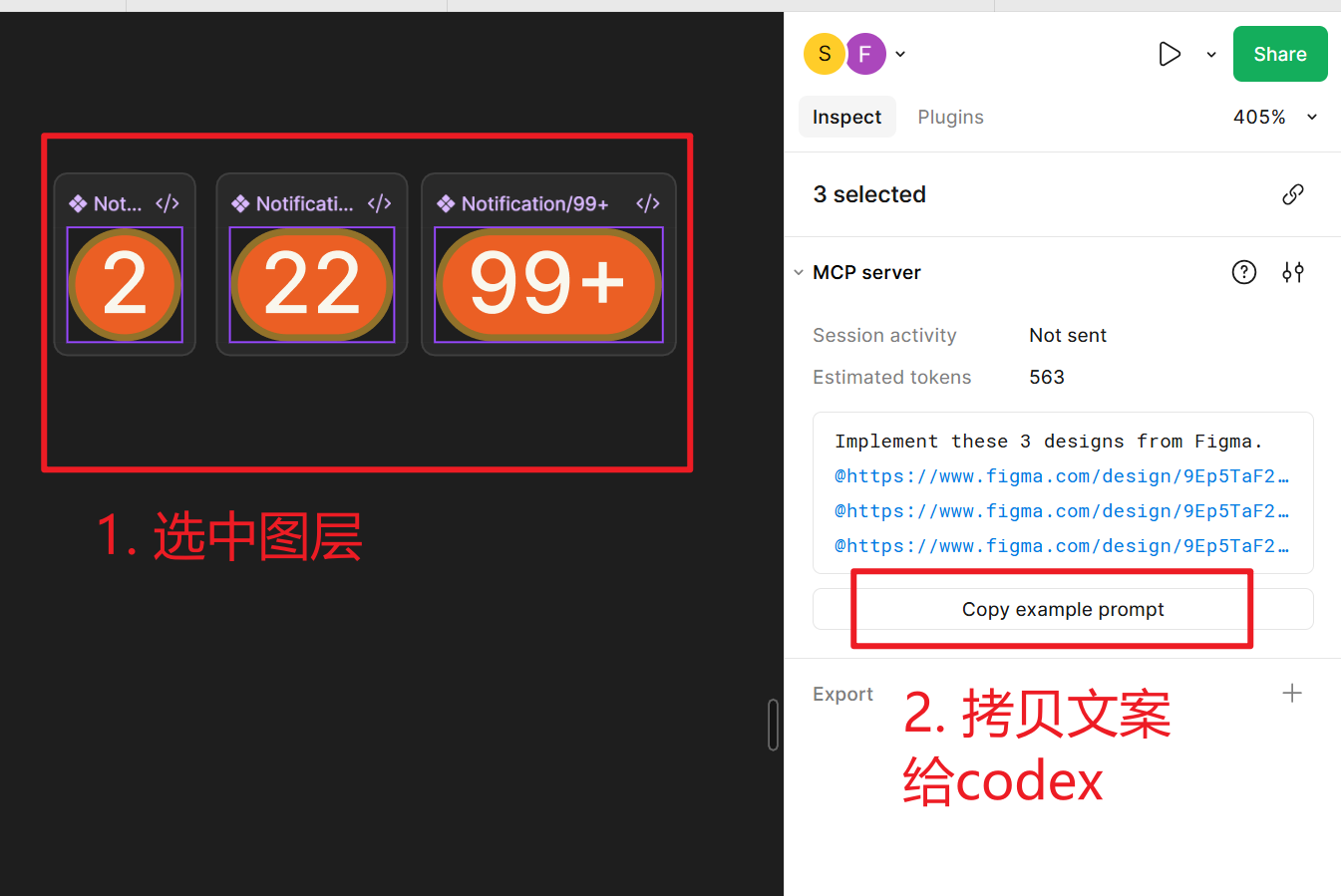
- 打开 Figma,切到 Dev Mode,选中要实现的 frame/component。
- 确认本地 Figma MCP 进程已启动(默认 3845 端口可访问)。
- 在 VS Code 的 Codex 面板输入指令,例如:“根据我当前 Figma 选中生成 React 代码,保持像素级还原”。
- 如需更多上下文,可让 Codex 先调用
get_screenshot或get_variable_defs再继续实现。
6. 常见问题
- 看不到 Figma MCP?检查 config 的
url是否正确、端口是否占用。 - 生成代码缺少样式?让 Codex 调用
get_variable_defs获取变量后再生成。 - 大屏页面超时?先用
get_metadata看结构,再分块调用get_code。